Showing posts with label textview. Show all posts
Showing posts with label textview. Show all posts
Sunday, February 1, 2015
Android beginner tutorial Part 11 TextView customization
As I said in the previous tutorial, the class has multiple methods and attributes. Besides android:text attribute, there are a few other that are considered one of the most commonly set attributes. These are android:textSize, android:textStyle and android:textColor.
The android:textSize attribute sets the size of the displayed text. The possible units of measurement here are:
- px - pixels
- dp - density-independent pixels
- sp - scale-independent pixels
- in - inches
- pt - points (1/72 of an inch)
- mm - millimeters
Usually the "sp" unit is used, which displays fonts more correctly.
Example:
android:textSize="32sp";
The next attribute, android:textStyle, sets the style of the text and has 3 possible values - normal, bold and italic.
Example:
android:textStyle="bold";
The android:textColor attribute sets the color of your text. It has 4 possible value formats:
- #RGB
- #ARGB
- #RRGGBB
- #AARRGGBB
Where R - red, G - green, B - blue, A - alpha channel. The alpha channel value ranges from 0 to 1.
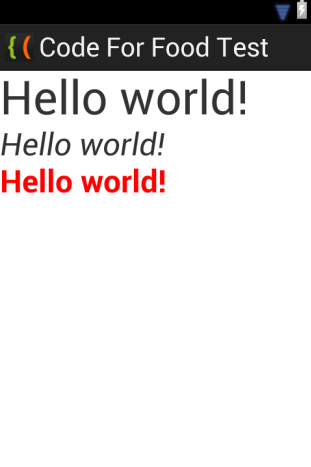
Now lets create a simple example, which displays the same text in 3 different TextViews.
Open our test Android project, go to res/values/strings.xml file and edit it to add a string that holds a "Hello world!" text, with an id "helloText":
<?xml version="1.0" encoding="utf-8"?>
<resources>

    <string name="app_name">Code For Food Test</string>
    <string name="helloText">Hello world!</string>
    <string name="menu_settings">Settings</string>

</resources>
Now go to activity_main.xml in res/layout/ to add 3 TextViews to the Activity:
<LinearLayout xmlns:android="http://schemas.android.com/apk/res/android"
    xmlns:tools="http://schemas.android.com/tools"
    android:layout_width="match_parent"
    android:layout_height="match_parent"
    android:orientation="vertical"
    tools:context=".MainActivity" >

    <TextView
        android:layout_width="wrap_content"
        android:layout_height="wrap_content"
        android:text="@string/helloText"
        android:textSize="48sp"/>

    <TextView
        android:layout_width="wrap_content"
        android:layout_height="wrap_content"
        android:text="@string/helloText"
        android:textSize="32sp"
        android:textStyle="italic"/>

    <TextView
        android:layout_width="wrap_content"
        android:layout_height="wrap_content"
        android:text="@string/helloText"
        android:textSize="32sp"
        android:textStyle="bold"
        android:textColor="#f00"
        />

</LinearLayout>
The results:
Thats all for today.
Thanks for reading!

Subscribe to:
Posts (Atom)