Sunday, February 1, 2015
Creating a Flex AIR text editor Part 58
Find the bDeleteSnippet button in your file and set its click even handler to deleteSnippet() function in SnippetWindow.mxml:
<s:Button id="bDeleteSnippet" label="Delete snippet" enabled="false" click="deleteSnippet();" />
This function is all that were going to work with in this tutorial, and it is a pretty complex function.
When deleting a snippet, 3 things need to happen in order. Firstly, the item gets removed from the database. Secondly, all the snippets that were below this snippet have their snippetPosition value updated (each value is substracted by 1, so that we dont have a "hole") in the XML. Thirdly, the same is done but now with SQL database. Moreover, we need to keep in mind that our snippets can be located both in categories and outside of them (root tags).
Firstly we declare 5 variables - currentPos, currentId, currentCategoryID, currentCategoryPos and totalSnippetsBelow. The first four were already introduced and used in previous tutorials in other functions, and the final variable is used store the number of snippets that we need to update. When we declare it, leave it empty.
var currentPos:int = snippetManageTree.selectedItem.@snippetPosition;
var currentId:int = snippetManageTree.selectedItem.@id;
var currentCategoryID:int = snippetManageTree.selectedItem.@categoryID;
var currentCategoryPos:int = NaN;

if (currentCategoryID != -1) {
currentCategoryPos = treeData.category.(@id == currentCategoryID).@categoryPosition;
}
var totalSnippetsBelow:int;
Now we remove the item from the database using the id provided. Pretty simple:
// Delete from the SQL database
var stat:SQLStatement = new SQLStatement();
stat.sqlConnection = snippetConnection;
stat.text = "DELETE FROM snippets WHERE id=" + currentId;
stat.execute();
Now we have to check where the snippet is located - a category or root tags. Firstly we will do the code that is executed if the snippet is in a category.
Here we delete the item from the XML, then loop through all the snippets below and update their values (both in XML and SQL):
// If in a category:
if (currentCategoryID != -1) {

// Delete from the XML
delete treeData.category[currentCategoryPos].snippet[currentPos];

// Increase snippetPosition of all snippets below
totalSnippetsBelow = treeData.category[currentCategoryPos].children().length() - currentPos;

for (var i:int = 0; i < totalSnippetsBelow; i++) {
treeData.category[currentCategoryPos].snippet[currentPos + i].@snippetPosition = currentPos + i;

var snipStat1:SQLStatement = new SQLStatement();
snipStat1.sqlConnection = snippetConnection;
snipStat1.text = "UPDATE snippets SET snippetPosition=@snippetPosition WHERE snippetPosition=" + (currentPos + i);
snipStat1.parameters["@snippetPosition"] = currentPos + i - 1;
snipStat1.execute();
}

}
Root tags now, similar, except for the paths:
// If in a root tags:
if (currentCategoryID == -1) {

// Delete from the XML
delete treeData.snippet[currentPos];

// Increase snippetPosition of all snippets below
totalSnippetsBelow = treeData.snippet.length() - currentPos;

for (var u:int = 0; u < totalSnippetsBelow; u++) {
treeData.snippet[currentPos + u].@snippetPosition = currentPos + u;

var snipStat2:SQLStatement = new SQLStatement();
snipStat2.sqlConnection = snippetConnection;
snipStat2.text = "UPDATE snippets SET snippetPosition=@snippetPosition WHERE snippetPosition=" + (currentPos + u);
snipStat2.parameters["@snippetPosition"] = currentPos + u - 1;
snipStat2.execute();
}

}
Finally, we disable all the selection related components:
// Disable all selection enabled components

bSaveSnippet.enabled = false;
bDeleteSnippet.enabled = false;
bSaveCategory.enabled = false;
bDeleteCategory.enabled = false;
upCategory.enabled = false;
downCategory.enabled = false;
upSnippet.enabled = false;
downSnippet.enabled = false;
Full deleteSnippet() function:
private function deleteSnippet():void {
var currentPos:int = snippetManageTree.selectedItem.@snippetPosition;
var currentId:int = snippetManageTree.selectedItem.@id;
var currentCategoryID:int = snippetManageTree.selectedItem.@categoryID;
var currentCategoryPos:int = NaN;

if (currentCategoryID != -1) {
currentCategoryPos = treeData.category.(@id == currentCategoryID).@categoryPosition;
}
var totalSnippetsBelow:int;

// Delete from the SQL database
var stat:SQLStatement = new SQLStatement();
stat.sqlConnection = snippetConnection;
stat.text = "DELETE FROM snippets WHERE id=" + currentId;
stat.execute();

// If in a category:
if (currentCategoryID != -1) {

// Delete from the XML
delete treeData.category[currentCategoryPos].snippet[currentPos];

// Increase snippetPosition of all snippets below
totalSnippetsBelow = treeData.category[currentCategoryPos].children().length() - currentPos;

for (var i:int = 0; i < totalSnippetsBelow; i++) {
treeData.category[currentCategoryPos].snippet[currentPos + i].@snippetPosition = currentPos + i;

var snipStat1:SQLStatement = new SQLStatement();
snipStat1.sqlConnection = snippetConnection;
snipStat1.text = "UPDATE snippets SET snippetPosition=@snippetPosition WHERE snippetPosition=" + (currentPos + i);
snipStat1.parameters["@snippetPosition"] = currentPos + i - 1;
snipStat1.execute();
}

}

// If in a root tags:
if (currentCategoryID == -1) {

// Delete from the XML
delete treeData.snippet[currentPos];

// Increase snippetPosition of all snippets below
totalSnippetsBelow = treeData.snippet.length() - currentPos;

for (var u:int = 0; u < totalSnippetsBelow; u++) {
treeData.snippet[currentPos + u].@snippetPosition = currentPos + u;

var snipStat2:SQLStatement = new SQLStatement();
snipStat2.sqlConnection = snippetConnection;
snipStat2.text = "UPDATE snippets SET snippetPosition=@snippetPosition WHERE snippetPosition=" + (currentPos + u);
snipStat2.parameters["@snippetPosition"] = currentPos + u - 1;
snipStat2.execute();
}

}

// Disable all selection enabled components

bSaveSnippet.enabled = false;
bDeleteSnippet.enabled = false;
bSaveCategory.enabled = false;
bDeleteCategory.enabled = false;
upCategory.enabled = false;
downCategory.enabled = false;
upSnippet.enabled = false;
downSnippet.enabled = false;
}
Full SnippetWindow.mxml code:
<?xml version="1.0" encoding="utf-8"?>
<mx:Window xmlns:fx="http://ns.adobe.com/mxml/2009"
xmlns:s="library://ns.adobe.com/flex/spark"
xmlns:mx="library://ns.adobe.com/flex/mx"
xmlns:custom="*"
title="Snippet management" type="utility" width="500" height="730"
creationComplete="init();" showStatusBar="false" alwaysInFront="true" resizable="false" backgroundColor="#dddddd">

<fx:Script>
<![CDATA[
import flash.data.SQLConnection;
import flash.data.SQLResult;
import flash.data.SQLStatement;
import flash.events.Event;
import flash.net.Responder;
import mx.controls.Alert;

[Bindable]
public var treeData:XMLList;
private var snippetConnection:SQLConnection;
private var categoryConnection:SQLConnection;
[Bindable]
private var categories:Array = [];

private function init():void{
this.addEventListener(Event.CLOSING, onClose);
}

private function onClose(evt:Event):void {
this.visible = false;
evt.preventDefault();
}

public function setValues(xmlData:XMLList, conn1:SQLConnection, conn2:SQLConnection, createNewOnStart:Boolean = false, newText:String = ""):void {
snippetConnection = conn1;
categoryConnection = conn2;
treeData = xmlData;
newTextInput.text = newText;
newNameInput.text = "New snippet name here";
if (newText=="") {
newTextInput.text = "New snippet text here";
}
updateCategoryCombo();
}

private function addSnippet(name:String, text:String):void{
if (name != "" && text != "") {
var stat:SQLStatement = new SQLStatement();
stat.sqlConnection = snippetConnection;
stat.text = "INSERT INTO snippets (snippetName, snippetText, categoryID, snippetPosition) VALUES (@snippetName, @snippetText, @categoryID, @snippetPosition);"
stat.parameters["@snippetName"] = name;
stat.parameters["@snippetText"] = text;
stat.parameters["@categoryID"] = categoryCombo.selectedItem.ind;
stat.parameters["@snippetPosition"] = totalItemsIn(categoryCombo.selectedItem.ind);
stat.execute(-1, new Responder(addSnippetXML));
}else {
Alert.show("The name and text of the snippet must not be blank!","Oops!");
}
}

private function addSnippetXML(evt:SQLResult):void {
if (treeData.category.length() == 0 && treeData..snippet.length() == 0) {
treeData = new XMLList(<root></root>);
}
var aSnippet:XML = <snippet/>;
aSnippet.@id = evt.lastInsertRowID;
aSnippet.@label = newNameInput.text;
aSnippet.@categoryID = categoryCombo.selectedItem.ind;
aSnippet.@snippetPosition = totalItemsIn(categoryCombo.selectedItem.ind);
aSnippet.@isBranch = false;
if(aSnippet.@categoryID!=-1){
treeData.category.(@id == categoryCombo.selectedItem.ind).appendChild(aSnippet);
}else {
treeData[0].appendChild(aSnippet);
}
}

private function addCategory(name:String):void {
if (name != "") {
var stat:SQLStatement = new SQLStatement();
stat.sqlConnection = categoryConnection;
stat.text = "INSERT INTO categories (categoryName, categoryPosition) VALUES (@categoryName, @categoryPosition);"
stat.parameters["@categoryName"] = name;
stat.parameters["@categoryPosition"] = treeData.category.length();
stat.execute(-1, new Responder(addCategoryXML));
}else {
Alert.show("The name of the category must not be blank!","Oops!");
}
}

private function addCategoryXML(evt:SQLResult):void {
if (treeData.category.length() == 0 && treeData..snippet.length() == 0) {
treeData = new XMLList(<root></root>);
}
var aCategory:XML = <category/>;
aCategory.@id = evt.lastInsertRowID;
aCategory.@label = newCategoryInput.text;
aCategory.@categoryPosition = treeData.category.length();
aCategory.@isBranch = true;
if(treeData.category.length()>0){
var prevLastCategory:XML = treeData.category[treeData.category.length()-1];
treeData[0].insertChildAfter(prevLastCategory, aCategory);
} else
if(treeData[0].snippet.length()>0){
var firstSnippet:XML = treeData[0].snippet[0];
treeData[0].insertChildBefore(firstSnippet, aCategory);
} else {
treeData[0].appendChild(aCategory);
}
snippetManageTree.selectedItem = aCategory;
selectTree();
updateCategoryCombo();
}

private function updateCategoryCombo():void{
categories = [];
categories.push( { label:"No category", ind: -1 } );
for each (var cat:XML in treeData.category) {
categories.push({label:cat.@label, ind:cat.@id});
}
categoryCombo.selectedIndex = 0;
}

private function totalItemsIn(id:int):int {
var toRet:int;
if(id>=0){
toRet = treeData.category.(@id == id).children().length();
}
if (id == -1) {
toRet = treeData.snippet.length();
}
return toRet;
}

private function selectTree():void {
bSaveSnippet.enabled = false;
bDeleteSnippet.enabled = false;
bSaveCategory.enabled = false;
bDeleteCategory.enabled = false;
upCategory.enabled = false;
downCategory.enabled = false;
upSnippet.enabled = false;
downSnippet.enabled = false;

if (snippetManageTree.selectedItem.@isBranch == true) {
bSaveCategory.enabled = true;
bDeleteCategory.enabled = true;
upCategory.enabled = canCategoryUp();
downCategory.enabled = canCategoryDown();
newCategoryInput.text = snippetManageTree.selectedItem.@label;
} else {
bSaveSnippet.enabled = true;
bDeleteSnippet.enabled = true;
upSnippet.enabled = canSnippetUp();
downSnippet.enabled = canSnippetDown();
categoryCombo.selectedIndex = treeData.category.(@id == snippetManageTree.selectedItem.@categoryID).@categoryPosition + 1;
if (snippetManageTree.selectedItem.@categoryID == -1) {
categoryCombo.selectedIndex = 0;
}
var stat:SQLStatement = new SQLStatement();
stat.sqlConnection = snippetConnection;
stat.text = "SELECT snippetText FROM snippets WHERE id=" + snippetManageTree.selectedItem.@id;
stat.execute( -1, new Responder(loadSnippetText));
}
}

private function loadSnippetText(evt:SQLResult):void{
newNameInput.text = snippetManageTree.selectedItem.@label;
newTextInput.text = evt.data[0].snippetText;
}

private function canCategoryUp():Boolean {
var toRet:Boolean = true;
if (snippetManageTree.selectedItem.@categoryPosition == 0) {
toRet = false;
}
return toRet;
}

private function canCategoryDown():Boolean {
var toRet:Boolean = true;
if (snippetManageTree.selectedItem.@categoryPosition == (treeData.category.length()-1)) {
toRet = false;
}
return toRet;
}

private function canSnippetUp():Boolean {
var toRet:Boolean = true;
if (snippetManageTree.selectedItem.@snippetPosition == 0) {
toRet = false;
}
return toRet;
}

private function canSnippetDown():Boolean {
var toRet:Boolean = true;
if (snippetManageTree.selectedItem.@categoryID != -1 && snippetManageTree.selectedItem.@snippetPosition == (treeData.category.(@id == snippetManageTree.selectedItem.@categoryID).children().length()-1)) {
toRet = false;
}
if (snippetManageTree.selectedItem.@snippetPosition == (treeData.snippet.length()-1)) {
toRet = false;
}
return toRet;
}

private function categoryMove(dir:String):void{
var currentPos:int = snippetManageTree.selectedItem.@categoryPosition;
var currentId:int = snippetManageTree.selectedItem.@id;
var newPos:int = (dir=="up")?(currentPos - 1):(currentPos + 1);

// Databases:

// Set the above categorys position to current one
var stat:SQLStatement = new SQLStatement();
stat.sqlConnection = categoryConnection;
stat.text = "UPDATE categories SET categoryPosition=@currentPos WHERE categoryPosition=@newPos"
stat.parameters["@newPos"] = newPos;
stat.parameters["@currentPos"] = currentPos;
stat.execute();

// Set the current categorys position to the one above
var stat2:SQLStatement = new SQLStatement();
stat2.sqlConnection = categoryConnection;
stat2.text = "UPDATE categories SET categoryPosition=@newPos WHERE id=@currentId"
stat2.parameters["@newPos"] = newPos;
stat2.parameters["@currentId"] = currentId;
stat2.execute();

// XML:

var copy:XML = treeData.category[currentPos].copy();
delete treeData.category[currentPos];
if(dir=="up"){
treeData.insertChildBefore(treeData.category[newPos], copy);
}else {
treeData.insertChildAfter(treeData.category[currentPos], copy);
}
copy.@categoryPosition = newPos;
treeData.category[currentPos].@categoryPosition = currentPos;
snippetManageTree.selectedItem = copy;
selectTree();
}

private function snippetMove(dir:String):void{
var currentPos:int = snippetManageTree.selectedItem.@snippetPosition;
var currentId:int = snippetManageTree.selectedItem.@id;
var newPos:int = (dir == "up")?(currentPos - 1):(currentPos + 1);
var currentCategoryID:int = snippetManageTree.selectedItem.@categoryID;
var currentCategoryPos:int = NaN;

if (currentCategoryID != -1) {
currentCategoryPos = treeData.category.(@id == currentCategoryID).@categoryPosition;
}

// Databases:

// Set the above categorys position to current one
var stat:SQLStatement = new SQLStatement();
stat.sqlConnection = snippetConnection;
stat.text = "UPDATE snippets SET snippetPosition=@currentPos WHERE snippetPosition=@newPos"
stat.parameters["@newPos"] = newPos;
stat.parameters["@currentPos"] = currentPos;
stat.execute();

// Set the current categorys position to the one above
var stat2:SQLStatement = new SQLStatement();
stat2.sqlConnection = snippetConnection;
stat2.text = "UPDATE snippets SET snippetPosition=@newPos WHERE id=@currentId"
stat2.parameters["@newPos"] = newPos;
stat2.parameters["@currentId"] = currentId;
stat2.execute();

// XML:

var copy:XML = new XML();

if(currentCategoryID != -1){
copy = treeData.category[currentCategoryPos].snippet[currentPos].copy();
delete treeData.category[currentCategoryPos].snippet[currentPos];
if(dir=="up"){
treeData.category[currentCategoryPos].insertChildBefore(treeData.category[currentCategoryPos].snippet[newPos], copy);
}else {
treeData.category[currentCategoryPos].insertChildAfter(treeData.category[currentCategoryPos].snippet[currentPos], copy);
}
copy.@snippetPosition = newPos;
treeData.category[currentCategoryPos].snippet[currentPos].@snippetPosition = currentPos;
}

if(currentCategoryID == -1){
copy = treeData.snippet[currentPos].copy();
delete treeData.snippet[currentPos];
if(dir=="up"){
treeData.insertChildBefore(treeData.snippet[newPos], copy);
}else {
treeData.insertChildAfter(treeData.snippet[currentPos], copy);
}
copy.@snippetPosition = newPos;
treeData.snippet[currentPos].@snippetPosition = currentPos;
}

snippetManageTree.selectedItem = copy;
selectTree();
}

private function saveCategory():void {
var currentID:int = snippetManageTree.selectedItem.@id;

var stat:SQLStatement = new SQLStatement();
stat.sqlConnection = categoryConnection;
stat.text = "UPDATE categories SET categoryName=@categoryName WHERE id=" + currentID;
stat.parameters["@categoryName"] = newCategoryInput.text;
stat.execute();

treeData.category[snippetManageTree.selectedItem.@categoryPosition].@label = newCategoryInput.text;
updateCategoryCombo();
}

private function saveSnippet():void {
var currentID:int = snippetManageTree.selectedItem.@id;

var stat:SQLStatement = new SQLStatement();
stat.sqlConnection = snippetConnection;
stat.text = "UPDATE snippets SET snippetName=@snippetName, snippetText=@snippetText WHERE id=" + currentID;
stat.parameters["@snippetName"] = newNameInput.text;
stat.parameters["@snippetText"] = newTextInput.text;
stat.execute();

var currentPos:int = snippetManageTree.selectedItem.@snippetPosition;
var currentCategoryID:int = snippetManageTree.selectedItem.@categoryID;
var currentCategoryPos:int;

if (currentCategoryID != -1) {
currentCategoryPos = treeData.category.(@id == currentCategoryID).@categoryPosition;
treeData.category[currentCategoryPos].snippet[currentPos].@label = newNameInput.text;
}else {
treeData.snippet[currentPos].@label = newNameInput.text;
}

}

private function deleteSnippet():void {
var currentPos:int = snippetManageTree.selectedItem.@snippetPosition;
var currentId:int = snippetManageTree.selectedItem.@id;
var currentCategoryID:int = snippetManageTree.selectedItem.@categoryID;
var currentCategoryPos:int = NaN;

if (currentCategoryID != -1) {
currentCategoryPos = treeData.category.(@id == currentCategoryID).@categoryPosition;
}
var totalSnippetsBelow:int;

// Delete from the SQL database
var stat:SQLStatement = new SQLStatement();
stat.sqlConnection = snippetConnection;
stat.text = "DELETE FROM snippets WHERE id=" + currentId;
stat.execute();

// If in a category:
if (currentCategoryID != -1) {

// Delete from the XML
delete treeData.category[currentCategoryPos].snippet[currentPos];

// Increase snippetPosition of all snippets below
totalSnippetsBelow = treeData.category[currentCategoryPos].children().length() - currentPos;

for (var i:int = 0; i < totalSnippetsBelow; i++) {
treeData.category[currentCategoryPos].snippet[currentPos + i].@snippetPosition = currentPos + i;

var snipStat1:SQLStatement = new SQLStatement();
snipStat1.sqlConnection = snippetConnection;
snipStat1.text = "UPDATE snippets SET snippetPosition=@snippetPosition WHERE snippetPosition=" + (currentPos + i);
snipStat1.parameters["@snippetPosition"] = currentPos + i - 1;
snipStat1.execute();
}

}

// If in a root tags:
if (currentCategoryID == -1) {

// Delete from the XML
delete treeData.snippet[currentPos];

// Increase snippetPosition of all snippets below
totalSnippetsBelow = treeData.snippet.length() - currentPos;

for (var u:int = 0; u < totalSnippetsBelow; u++) {
treeData.snippet[currentPos + u].@snippetPosition = currentPos + u;

var snipStat2:SQLStatement = new SQLStatement();
snipStat2.sqlConnection = snippetConnection;
snipStat2.text = "UPDATE snippets SET snippetPosition=@snippetPosition WHERE snippetPosition=" + (currentPos + u);
snipStat2.parameters["@snippetPosition"] = currentPos + u - 1;
snipStat2.execute();
}

}

// Disable all selection enabled components

bSaveSnippet.enabled = false;
bDeleteSnippet.enabled = false;
bSaveCategory.enabled = false;
bDeleteCategory.enabled = false;
upCategory.enabled = false;
downCategory.enabled = false;
upSnippet.enabled = false;
downSnippet.enabled = false;
}
]]>
</fx:Script>

<s:VGroup paddingLeft="5" paddingRight="5" paddingTop="5" paddingBottom="5">
<s:Label text="Snippet creation and management: " />
<s:HGroup>
<s:TextInput id="newNameInput" text="New snippet name" width="240" />
<mx:ComboBox id="categoryCombo" width="240" dataProvider="{categories}" />
</s:HGroup>
<s:TextArea id="newTextInput" width="490" height="200" text="Snippet text" />
<s:HGroup>
<s:Button id="bAddSnippet" label="Add snippet" click="addSnippet(newNameInput.text, newTextInput.text);" />
<s:Button id="bSaveSnippet" label="Save changes" enabled="false" />
<s:Button id="bDeleteSnippet" label="Delete snippet"  enabled="false" click="deleteSnippet();" />
<custom:IconButton id="upSnippet" icon="@Embed(../lib/arrow_up.png)" toolTip="Move up" enabled="false" click="snippetMove(up);" />
<custom:IconButton id="downSnippet" icon="@Embed(../lib/arrow_down.png)" toolTip="Move down" enabled="false" click="snippetMove(down);" />
</s:HGroup>

<s:Label text="" />

<s:Label text="Category creation and management: " />
<s:TextInput id="newCategoryInput" text="New category name" width="490" />
<s:HGroup>
<s:Button id="bAddCategory" label="Add category" click="addCategory(newCategoryInput.text);"/>
<s:Button id="bSaveCategory" label="Save changes" enabled="false" click="saveCategory();" />
<s:Button id="bDeleteCategory" label="Delete category with its contents" enabled="false"/>
<custom:IconButton id="upCategory" icon="@Embed(../lib/arrow_up.png)" toolTip="Move up" enabled="false" click="categoryMove(up);" />
<custom:IconButton id="downCategory" icon="@Embed(../lib/arrow_down.png)" toolTip="Move down" enabled="false" click="categoryMove(down);" />
</s:HGroup>

<s:Label text="" />

<mx:Tree id="snippetManageTree" dataProvider="{treeData}" width="490" height="300" showRoot="false" labelField="@label" itemClick="selectTree();" />
</s:VGroup>

</mx:Window>
Thanks for reading!

How to use ZBrush 4 Video Tutorials for Beginners

ZBrush 4 Essential Training by 
START LEARNING TODAY!
 or
or 
WATCH THESE 6 FREE VIDEOS FROM THE COURSE
ZBrush 4 Essential Training - Welcome
Using Perspective and Floor - How to use ZBrush 4 | Video Tutorials for Beginners
Using ShadowBox - How to use ZBrush 4 | Video Tutorials for Beginners
Setting the stroke properties - How to use ZBrush 4 | Video Tutorials for Beginners
Texturing a head: A practical approach - How to use ZBrush 4 | Video Tutorials for Beginners
Using UV Master - How to use ZBrush 4 | Video Tutorials for Beginners
Using Perspective and Floor - How to use ZBrush 4 | Video Tutorials for Beginners
Using ShadowBox - How to use ZBrush 4 | Video Tutorials for Beginners
Setting the stroke properties - How to use ZBrush 4 | Video Tutorials for Beginners
Texturing a head: A practical approach - How to use ZBrush 4 | Video Tutorials for Beginners
Using UV Master - How to use ZBrush 4 | Video Tutorials for Beginners
START LEARNING TODAY!
or Course Information
Training Provider: Lynda.com
Title: ZBrush 4 Essential Training
Author: Ryan Kittleson
Duration: 2hrs 47mins
Date of release: 08 April 2011
Chapter 1: Understanding the Interface
Making sense of ZBrush
Understanding the interface
Using Light Box
Navigating the canvas
Using Perspective and Floor
Understanding local centering
Trying different materials
Activating symmetry
Viewing your work in various ways
Chapter 2: Creating Meshes
Understanding polygon-based models
Creating ZSpheres
Using ShadowBox
Making a ZSketch
Extracting from an existing mesh
Using primitive 3D meshes
Importing from other programs
Chapter 3: Brushes and Sculpting
Understanding brush settings
Inverting brush effects
Switching to Smooth mode
Setting the stroke properties
Working with alphas
Using the Move brush
Using the Clip brush
Learning a few more common brushes (Polish, Clay, Flatten, Inflate, Tracks)
Saving and using brush presets
Chapter 4: Working with Tools
Working with tools and projects
Working with subdivision levels
Masking off parts of your model
Masking based on cavity and occlusion
Selecting and hiding parts of a tool
Working with polygroups
Using deformation
Mirroring geometry across an axis
Restoring symmetry
Creating morph targets
Understanding surface normal direction
Chapter 5: Working with Subtools
Learning the basics of subtools
Making new subtools
Combining subtools
Chapter 6: Deforming with Transpose
Masking with Transpose
Adjusting the Transpose Manipulator
Moving, scaling, and rotating with Transpose
Chapter 7: Painting and Texturing with Color
Understanding how ZBrush uses color
Learning the basics of Spotlight
Painting and texturing with Spotlight
Texturing a head: A practical approach
Chapter 8: Retopology: Making Riggable Models
Drawing new edge flow for retopology
Tips for making good edge flow
Creating new topology
Transferring detail from the old model to the new
Chapter 9: UV Layout and Maps
Understanding the UV maps
Installing the UV Master plug-in
Using UV Master
Creating texture maps
Chapter 10: Troubleshooting
Preventing problems
Recovering a corrupted model
Recognizing and fixing common problems
Training Provider: Lynda.com
Title: ZBrush 4 Essential Training
Author: Ryan Kittleson
Duration: 2hrs 47mins
Date of release: 08 April 2011
Chapter 1: Understanding the Interface
Making sense of ZBrush
Understanding the interface
Using Light Box
Navigating the canvas
Using Perspective and Floor
Understanding local centering
Trying different materials
Activating symmetry
Viewing your work in various ways
Chapter 2: Creating Meshes
Understanding polygon-based models
Creating ZSpheres
Using ShadowBox
Making a ZSketch
Extracting from an existing mesh
Using primitive 3D meshes
Importing from other programs
Chapter 3: Brushes and Sculpting
Understanding brush settings
Inverting brush effects
Switching to Smooth mode
Setting the stroke properties
Working with alphas
Using the Move brush
Using the Clip brush
Learning a few more common brushes (Polish, Clay, Flatten, Inflate, Tracks)
Saving and using brush presets
Chapter 4: Working with Tools
Working with tools and projects
Working with subdivision levels
Masking off parts of your model
Masking based on cavity and occlusion
Selecting and hiding parts of a tool
Working with polygroups
Using deformation
Mirroring geometry across an axis
Restoring symmetry
Creating morph targets
Understanding surface normal direction
Chapter 5: Working with Subtools
Learning the basics of subtools
Making new subtools
Combining subtools
Chapter 6: Deforming with Transpose
Masking with Transpose
Adjusting the Transpose Manipulator
Moving, scaling, and rotating with Transpose
Chapter 7: Painting and Texturing with Color
Understanding how ZBrush uses color
Learning the basics of Spotlight
Painting and texturing with Spotlight
Texturing a head: A practical approach
Chapter 8: Retopology: Making Riggable Models
Drawing new edge flow for retopology
Tips for making good edge flow
Creating new topology
Transferring detail from the old model to the new
Chapter 9: UV Layout and Maps
Understanding the UV maps
Installing the UV Master plug-in
Using UV Master
Creating texture maps
Chapter 10: Troubleshooting
Preventing problems
Recovering a corrupted model
Recognizing and fixing common problems
About Lynda.com
Lynda.com is an online video training provider with over 1000 courses covering a wide array of topics - 3D, video, business, the web, graphic design, programming, animation, photography, and more. They produce top quality video tutorials with the best industry experts as your instructors. With a subscription, you can log-in at any time, and learn at your own pace. New courses are added each week, and you will receive a certificate of completion for each course that you finish.
Start learning today!
If you enjoyed the sample videos above and want to access the entire ZBrush 4 Essential Training course, you can sign up for a lynda.com membership. Your membership will allow you to access not only this course, but also the entire lynda.com library for as low as $25 for 1-month. Their training library has over 1000 courses with 50,000+ video tutorials. No long-term commitment required. You can cancel your membership at any time.
Not yet convinced? Try a FREE 7-day trial.
As a special promotion, visitors of this site can get a FREE 7-day trial to lynda.com. This free trial gives you access to their entire training library of over 1000 courses.
If you liked these great-quality ZBrush 4 video tutorials for beginners, then sign-up for a lynda.com membership today to view this excellent training course on learning how to use ZBrush 4!Lynda.com is an online video training provider with over 1000 courses covering a wide array of topics - 3D, video, business, the web, graphic design, programming, animation, photography, and more. They produce top quality video tutorials with the best industry experts as your instructors. With a subscription, you can log-in at any time, and learn at your own pace. New courses are added each week, and you will receive a certificate of completion for each course that you finish.
Start learning today!
If you enjoyed the sample videos above and want to access the entire ZBrush 4 Essential Training course, you can sign up for a lynda.com membership. Your membership will allow you to access not only this course, but also the entire lynda.com library for as low as $25 for 1-month. Their training library has over 1000 courses with 50,000+ video tutorials. No long-term commitment required. You can cancel your membership at any time.
Not yet convinced? Try a FREE 7-day trial.
As a special promotion, visitors of this site can get a FREE 7-day trial to lynda.com. This free trial gives you access to their entire training library of over 1000 courses.
START LEARNING TODAY!
or Q8 ATM7013 Allwinner A13 Android Tablet Pc Firmware
Q8 ATM 7013 Allwinner A13
Android Tablet Firmware
Android Tablet Firmware
What board ID , Tablet CPU Chip ,Firmware Number does my Tablet have ?
Encyclopedia:-
Read Article About Allwinner Technology
Frequently Asked Question about Android Tablets
Tablet Flashing Tools:
- Tablet Flashing Tool : Firmware upgrade tool LiveSuit & Drivers
- Tablet Flashing Tool: Firmware upgrade Tool Phoenix Usb Pro
- Flashing with SD Card:Firmware update instruction with microSD card
Flashing Tutorials for Allwinner Tablets:
- LiveSuit Tutorial : how to flash tablet with LiveSuit
- Phoenix Usb PrO Video Tutorial :Tutorial
Recommended Tools for Common Tablet Issues:
You can also use : Android Multi Tools
Common Android Tablets issues :
The following firmware , ROM file will be used when your Android tablet facing various problems .
1. Forgotten Pattern Lock on Android Tablets.
2.Too many pattern attempts / Reset user lock.
3. Tablets PC stuck on Gmail account.
4. Android Tablet PC stuck on Android logo.
5. Tablet Android hang on start-up / Multiple errors generating by OS.
6. Market Android having problems or generating errors.
7.Upgrading to new Android version.
6. Market Android having problems or generating errors.
7.Upgrading to new Android version.
you can use this Android Tablet firmware, ROM to restore your Android China tablets to generic firmwares or upgrades . Make sure to charge battery upto 60%. Power failure during flashing may result dead or broken tablets.
Note : Flashing generic tablet firmware should be last option.
DOWNLOAD OFFICIAL FIRMWARE
Allwinner Q8 Firmwares Related Posts :-
- Q8 V6.6 Generic Rom
- Q8 V1.7 Generic Rom
- Q8 V2.6 GSL1680 Generic Rom
- q8-mxc622x-20121101 Generic Rom
- Q8-atm7013 Generic Rom
- Q8 tzx 713B Generic Rom
- Q8-a13-51324 Generic Rom
- Q8 V12 Generic Rom
Infographic PowerPoint software usage and market share
Here is an infographic on PowerPoint usage and market-share:
PowerPoint usage and Marketshare | Create infographics

Android beginner tutorial Part 11 TextView customization
As I said in the previous tutorial, the class has multiple methods and attributes. Besides android:text attribute, there are a few other that are considered one of the most commonly set attributes. These are android:textSize, android:textStyle and android:textColor.
The android:textSize attribute sets the size of the displayed text. The possible units of measurement here are:
- px - pixels
- dp - density-independent pixels
- sp - scale-independent pixels
- in - inches
- pt - points (1/72 of an inch)
- mm - millimeters
Usually the "sp" unit is used, which displays fonts more correctly.
Example:
android:textSize="32sp";
The next attribute, android:textStyle, sets the style of the text and has 3 possible values - normal, bold and italic.
Example:
android:textStyle="bold";
The android:textColor attribute sets the color of your text. It has 4 possible value formats:
- #RGB
- #ARGB
- #RRGGBB
- #AARRGGBB
Where R - red, G - green, B - blue, A - alpha channel. The alpha channel value ranges from 0 to 1.
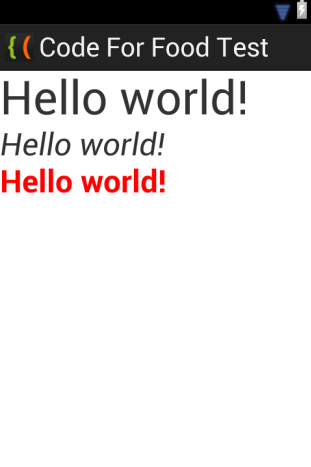
Now lets create a simple example, which displays the same text in 3 different TextViews.
Open our test Android project, go to res/values/strings.xml file and edit it to add a string that holds a "Hello world!" text, with an id "helloText":
<?xml version="1.0" encoding="utf-8"?>
<resources>

    <string name="app_name">Code For Food Test</string>
    <string name="helloText">Hello world!</string>
    <string name="menu_settings">Settings</string>

</resources>
Now go to activity_main.xml in res/layout/ to add 3 TextViews to the Activity:
<LinearLayout xmlns:android="http://schemas.android.com/apk/res/android"
    xmlns:tools="http://schemas.android.com/tools"
    android:layout_width="match_parent"
    android:layout_height="match_parent"
    android:orientation="vertical"
    tools:context=".MainActivity" >

    <TextView
        android:layout_width="wrap_content"
        android:layout_height="wrap_content"
        android:text="@string/helloText"
        android:textSize="48sp"/>

    <TextView
        android:layout_width="wrap_content"
        android:layout_height="wrap_content"
        android:text="@string/helloText"
        android:textSize="32sp"
        android:textStyle="italic"/>

    <TextView
        android:layout_width="wrap_content"
        android:layout_height="wrap_content"
        android:text="@string/helloText"
        android:textSize="32sp"
        android:textStyle="bold"
        android:textColor="#f00"
        />

</LinearLayout>
The results:
Thats all for today.
Thanks for reading!
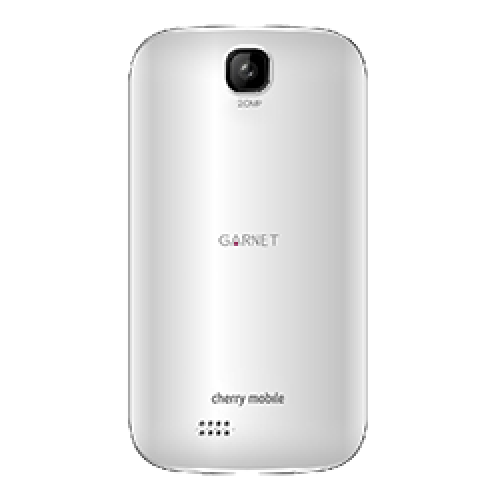
Hard Reset your Cherry Mobile Garnet and remove pattern lock password and gmail account
"PLEASE DROP A COMMENT IF THIS METHOD WORKS FOR YOUR PHONE THANK YOU"
Update: Tried this second time around yesterday and it is really working.
Update: Tried this second time around yesterday and it is really working.
Hard resetting / factory resetting your phone will solve the following issues:
1. If you forgot your pattern lock
2. If you forgot your gmail account
3. If you forgot your password
4. Apps that automatically force closing
5. Stuck in Cherry Mobile / Garnet Logo (sometimes does not work if the firmware is totally damage)
NOTE: Performing hard reset will erase your data.
To hard reset:
1. Turn off your phone
2. Press and Hold VOLUME UP + Power button then quickly insert USB cable ( you must plugged it in the PC). If you did not insert the USB cable Android system recovery will not appear
3. Select wipe / factory reset, press Volume rocker to navigate and press the Power Button to confirm your selection.
4. Reboot your phone.
Note: If performing hard reset did not succeed, you need to wipe the cache first in the android system recovery before performing wipe / factory reset.
I hope this tutorial helps you.. If you have any question just drop a comment.
Subscribe to:
Posts (Atom)